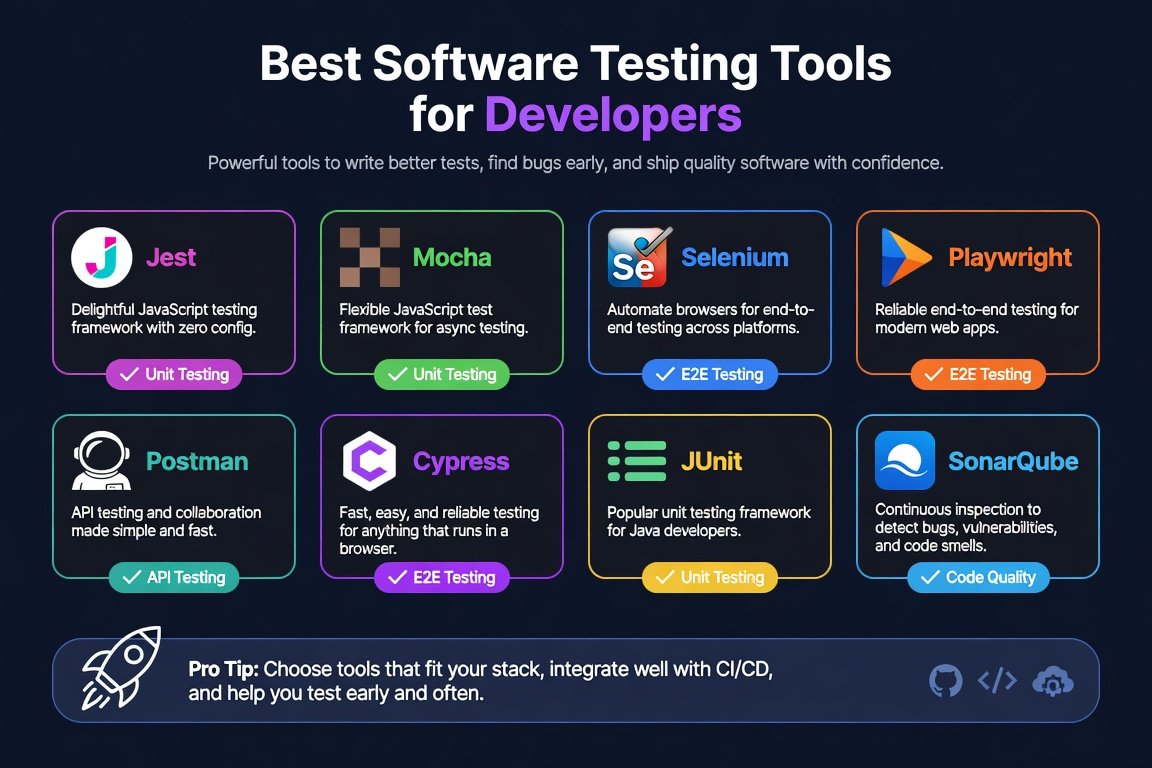
The best software testing tools depend on what you’re testing: Playwright or Cypress for web UI, Selenium for multi-language and legacy systems, Appium for mobile, Postman for APIs, and Jest/Vitest/pytest/JUnit for unit tests. As of 2026, Playwright has overtaken Selenium as the most-used E2E framework, with adoption surveys putting it around 41–45% among QA professionals versus roughly 22% for Selenium and 14–34% for Cypress depending on the survey. Start with free, open-source tools locally in CI, and add cloud platforms like BrowserStack or Sauce Labs only when you need real devices or older browsers.
Software testing tools help developers catch bugs earlier, speed up releases, and improve code quality. This guide covers the most practical options available today, from free open-source frameworks to cloud platforms, so you can match the right tool to your actual projects without wasting time or budget.
Key Takeaways
- Playwright has passed Selenium in adoption as of 2026 — it’s now the default recommendation for new web E2E projects
- Cypress remains strong for JavaScript-only frontend teams, but can’t handle true multi-tab/multi-origin flows the way Playwright does natively
- Selenium still leads for multi-language enterprise and legacy test suites, thanks to its broad language support and existing installed base
- Open-source tools cover the vast majority of real-world needs; cloud device platforms are worth paying for only once you need real Safari, older browsers, or physical mobile hardware
What Are Software Testing Tools?
Software testing tools are applications and frameworks that automate or support checking whether code works as expected. They cover unit tests (individual functions), integration tests (how parts work together), end-to-end (E2E) browser or mobile flows, API checks, and performance or load testing.
Popular categories used by developers today include:
- Web E2E automation (Playwright, Selenium, Cypress)
- Unit testing (Jest, Vitest, pytest, JUnit)
- API testing (Postman)
- Mobile automation (Appium)
- Cross-browser and real-device cloud platforms (BrowserStack, Sauce Labs)
- Load and performance (Apache JMeter)
Open-source tools form the core of most workflows because they’re free to start and integrate directly into CI/CD pipelines. Paid or freemium services add scale, real devices, and collaboration features. Pricing varies by plan, usage volume, and current promotions — always check the provider’s current plan details.
These tools reduce manual effort and make regressions visible before code reaches production.
Where the E2E Landscape Stands in 2026
The web E2E testing space has shifted meaningfully in the past couple of years, and it’s worth knowing the current picture before picking a default:
- Playwright has become the most-adopted framework for new projects, with 2026 surveys putting it around 41–45% adoption among QA professionals — up sharply from a few years ago. It wins on raw speed (it talks to browsers directly rather than through WebDriver), auto-waiting that cuts down on flaky tests, native parallel execution without needing a separate grid, and genuine multi-tab and multi-origin support.
- Selenium has declined to roughly 22% adoption in the same surveys, but its installed base remains enormous, especially in enterprise and legacy Java/Python test suites. Its main advantage is language breadth — Java, Python, C#, Ruby, JavaScript, and more.
- Cypress holds a steady niche, with adoption estimates ranging from about 14% to 34% depending on the survey and audience. It’s a strong choice for JavaScript-only frontend teams that value its developer experience, but it’s limited to Chromium and Firefox with incomplete Safari support, and struggles with multi-tab scenarios.
The practical takeaway: Playwright is the reasonable default for new web E2E projects today, Cypress is still a fine choice for JS-only teams that fit its constraints, and Selenium remains the pragmatic option for existing multi-language or legacy suites rather than something most teams start fresh with in 2026.
Real-World Scenarios for Different Developer Types

The best software testing tools depend on team size, language stack, and how often tests run.
| User Type | Typical Projects | Recommended Core Tools | Why It Fits | Watch-Outs |
|---|---|---|---|---|
| Light users (students, hobbyists, solo learners) | Personal apps, learning projects, small scripts | Jest or Vitest + Playwright (free) | Zero cost, fast feedback, simple setup | Limited parallel runs without extra setup |
| Indie / solo developers | Side projects, small SaaS, freelance work | Playwright or Cypress + Postman free tier | Quick local runs, strong JS support, API checks | Cloud device testing costs extra if needed |
| Small startups / 2–10 people | Web apps, MVPs, frequent deploys | Playwright + pytest/JUnit + Postman Team | Fast CI integration, multi-language options | Coordination on shared test data can get messy |
| Mid-size product teams | Feature-rich web + mobile products | Playwright/Selenium + Appium + BrowserStack | Cross-browser coverage, real devices | Monthly cloud costs rise with parallel sessions |
| Enterprise / large teams | Legacy systems, regulated apps, scale | Selenium + Appium + Sauce Labs or BrowserStack | Language flexibility, compliance, governance | Higher complexity and licensing overhead |
Light users gain the most from free, modern frameworks that run locally. Larger teams usually combine open-source cores with cloud infrastructure for real browsers and devices.
Step-by-Step Guide to Choosing and Implementing Software Testing Tools
- Identify what you need to test most.
- Web UI flows → start with Playwright or Cypress
- Multiple languages or older systems → Selenium
- Mobile apps → Appium
- APIs → Postman
- Unit-level logic → language-native tools (Jest/Vitest for JavaScript/TypeScript, pytest for Python, JUnit for Java)
- Evaluate language and framework fit. Playwright supports JavaScript, TypeScript, Python, Java, and C#. Cypress is strongest for JavaScript teams. Selenium offers the widest language coverage.
- Check local versus cloud needs. Run most tests locally or in CI for speed and cost control. Add a cloud service only when you need real Safari, older browsers, or physical iOS/Android devices.
- Start with the free tier and measure. Install Playwright or Selenium, write a few critical-path tests, and run them in your existing CI pipeline. Track flakiness and runtime before adding paid features.
- Integrate into daily workflow. Make tests part of pull-request checks. Keep the suite fast so developers run it often. Use parallel execution where the tool supports it — Playwright does this well out of the box, with no separate grid required.
- Review and expand. After 30–60 days, assess coverage gaps. Add API tests with Postman collections or mobile coverage with Appium only when those layers become bottlenecks.
This approach keeps early investment low and scales only when the data shows clear value.
Practical Tips and Common Mistakes
Tips that deliver results:
- Prioritize the most business-critical user paths first — a short, reliable suite beats a large, flaky one
- Use auto-waiting features (built into Playwright and Cypress) to reduce brittle sleeps and timeouts
- Store test data and environment variables outside the test code, so the same suite runs across local, staging, and CI environments
- Run tests on every pull request, but keep the full suite under a few minutes for the core set
- For cloud platforms, start with the lowest parallel-session plan and monitor usage — pricing varies by provider and current promotions
- Document the “why” for each major test so new team members understand the intent, not just the steps
Common mistakes to avoid:
- Choosing a tool only because it’s popular, without matching it to the tech stack — Cypress struggles with multi-tab or multi-origin scenarios that Playwright handles natively
- Writing tests that depend on exact pixel positions or brittle CSS selectors — prefer role-based or data-testid locators
- Ignoring maintenance cost — every new feature should come with a plan for updating affected tests
- Over-relying on record-and-playback for complex apps, since generated scripts often become hard to maintain
- Skipping unit tests in favor of only E2E — unit tests are faster and catch logic errors earlier
- Assuming free open-source tools have no ongoing cost — time spent on flaky tests and infrastructure still counts
These practices keep software testing tools productive instead of becoming a burden.
Conclusion
Software testing tools give developers a practical way to protect quality while shipping faster. Modern open-source options such as Playwright, Jest, pytest, and Postman cover the majority of everyday needs at zero or low cost, and Playwright in particular has become the clear default for new E2E projects as of 2026. Cloud platforms add real-device coverage when required. Match the tool to your language, team size, and release cadence, start small with the free tiers, and expand only after measuring results. Regular review of flakiness and runtime keeps the investment useful over time, and it’s worth checking current documentation and plan details before committing, since features and pricing continue to evolve.
FAQs
What is the best software testing tool for beginners in 2026?
Playwright or Jest for JavaScript/TypeScript developers. Both are free, well-documented, and provide fast feedback with modern features. Start with a single critical user flow and expand.
Are open-source software testing tools enough for professional work?
Yes, for most teams. Playwright, Selenium, Appium, pytest, and JUnit power production pipelines at companies of all sizes. Cloud services become useful mainly for real-device or large-scale parallel needs.
How do Playwright, Cypress, and Selenium compare for web testing?
As of 2026, Playwright leads in adoption, speed, and multi-browser reliability for modern apps, and has overtaken Selenium as the most-used framework in recent industry surveys. Cypress excels for pure JavaScript front-end work but has more limited cross-browser and multi-tab support. Selenium remains the strongest choice for multi-language teams and legacy systems.
Do I need a paid cloud service like BrowserStack or Sauce Labs?
Only if you require testing on real Safari, older browser versions, or physical mobile devices that you can’t maintain yourself. Many teams run the majority of tests locally or in free CI runners and reserve cloud time for final verification.
How often should software testing tools be reviewed or replaced?
Re-evaluate every 12–18 months or when the tech stack changes significantly. Focus on flakiness rate, average runtime, and developer adoption rather than switching for novelty.
Leave a Reply