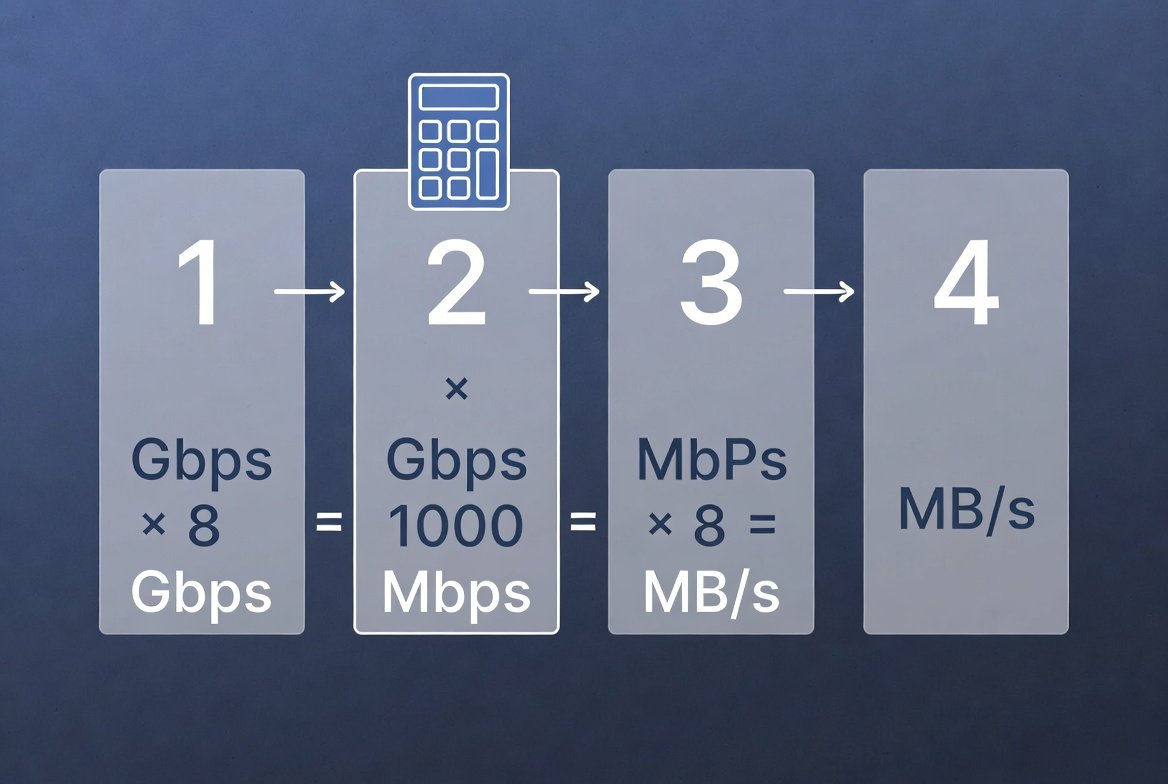
1 gigabit (Gb) = 125 megabytes (MB). To convert any speed, multiply the gigabit number by 125, or divide the megabit number by 8. A 1 Gbps internet plan delivers a theoretical maximum of 125 MB/s, though real-world speeds on a wired connection typically land between 90–115 MB/s.
Converting gigabit to megabyte is a simple calculation that helps U.S. internet users understand real download speeds. Most providers advertise speeds in gigabits per second (Gbps), yet file sizes, streaming apps, and download managers display data in megabytes (MB). Knowing the conversion lets you set realistic expectations for downloads, video quality, and multi-device households.
Key Takeaways
- 1 gigabit = 125 megabytes, because 1 byte = 8 bits
- A 1 Gbps plan realistically delivers 90–115 MB/s over a wired connection
- Wi-Fi, protocol overhead, and network congestion are the main reasons real speeds fall short of the advertised number
- Not every “gigabit” plan is exactly 1,000 Mbps — some are 940 Mbps or 1,200 Mbps depending on the provider
Understanding Gigabit vs. Megabyte
Internet speeds are measured in bits. Storage and file transfers are measured in bytes. One byte equals eight bits, and ISPs follow the decimal (base-10) system when marketing speeds.
| Unit | Equivalent |
|---|---|
| 1 gigabit (Gb) | 1,000 megabits (Mb) |
| 1 megabyte (MB) | 8 megabits (Mb) |
| 1 gigabit (Gb) | 125 megabytes (MB) |
| 1 Gbps | 125 MB/s |
This is the standard conversion used by major U.S. broadband providers for fiber and cable plans. Note the capital “B” for bytes and lowercase “b” for bits — mixing them up is the most common source of confusion in speed-test results and download estimates.
A 1 Gbps connection theoretically delivers up to 125 megabytes per second under ideal conditions. Real-world throughput is lower because of protocol overhead, Wi-Fi interference, and network congestion — typically landing between 90–115 MB/s on a well-optimized wired connection.
Real-World Scenarios: What 1 Gigabit Actually Delivers
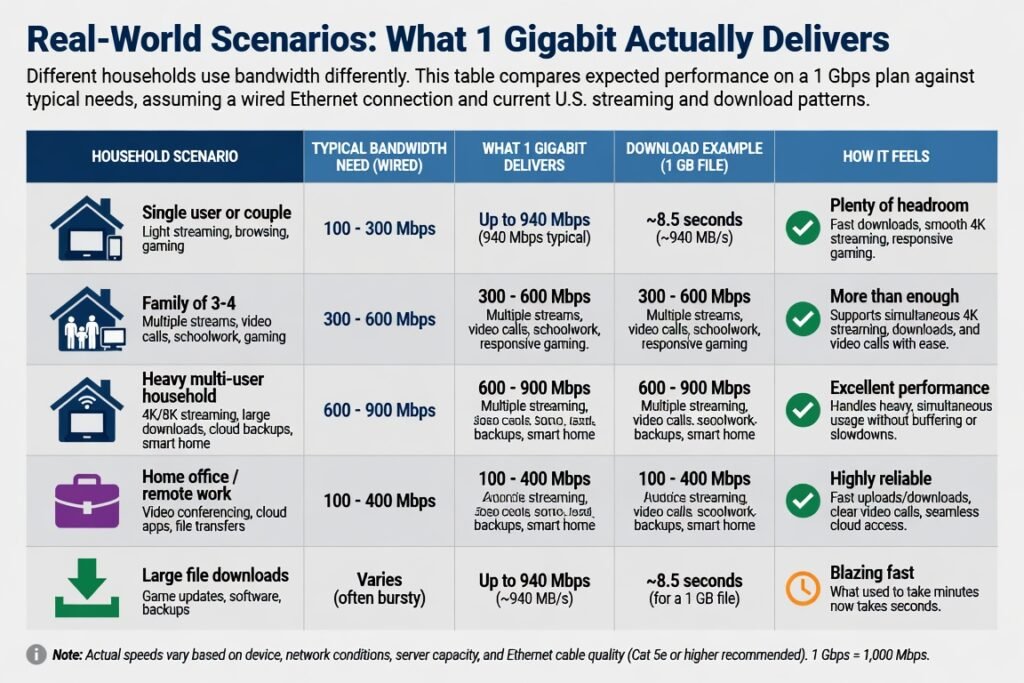
Different households use bandwidth differently. This table compares expected performance on a 1 Gbps plan against typical needs, assuming a wired Ethernet connection and current U.S. streaming and download patterns.
| Household Type | Typical Simultaneous Activities | Practical Speed Needed | Real-World Throughput on 1 Gbps | Result |
|---|---|---|---|---|
| Light user (1–2 people) | HD streaming, browsing, email, occasional downloads | 25–50 Mbps (3–6 MB/s) | 90–115 MB/s | Far more than enough; headroom for future devices |
| Standard family (3–4 people) | 4K streaming on 2–3 TVs, video calls, cloud backups, gaming | 200–400 Mbps (25–50 MB/s) | 90–115 MB/s | Comfortable with room for spikes |
| Remote-work + media household | Multiple video conferences, large file uploads/downloads, 4K streaming | 500–800 Mbps (60–100 MB/s) | 90–115 MB/s | Solid performance; watch for Wi-Fi bottlenecks |
| Heavy multi-user / content creator | 8K or high-bitrate 4K editing uploads, cloud sync of large libraries, several gamers | Near 1 Gbps sustained | 90–115 MB/s | Meets most needs; consider multi-gig plans only for extreme sustained transfers |
Light users rarely push beyond 50 Mbps. Families and remote workers benefit most from the headroom a gigabit connection provides during evening peak hours, when neighborhood congestion typically rises.
Step-by-Step: How to Convert Gigabit to Megabyte
Follow these steps for any speed rating:
- Identify the advertised speed in gigabits per second (example: 1 Gbps or 2 Gbps).
- Multiply by 1,000 to convert to megabits per second (1 Gbps = 1,000 Mbps).
- Divide by 8 to convert megabits to megabytes (1,000 ÷ 8 = 125).
- Result: megabytes per second (MB/s).
Quick reference formulas
- Gbps × 125 = MB/s
- Mbps ÷ 8 = MB/s
Worked example: A 940 Mbps cable plan (a common “gigabit” marketing label) converts as: 940 ÷ 8 = 117.5 MB/s theoretical maximum.
To verify on your own connection:
- Open a large file download from a trusted server (Microsoft, Apple, or a Linux distribution mirror).
- Note the reported MB/s in your browser or download manager.
- Compare it against the calculated figure. A result of 90–110 MB/s on a 1 Gbps plan is normal and healthy.
Most provider apps and independent speed-test tools also report both Mbps and MB/s side by side, so you rarely need to calculate this by hand.
Practical Tips & Common Mistakes
Tips that work
- Test with a wired Ethernet connection first — Wi-Fi 5 and early Wi-Fi 6 routinely lose 20–40% of available speed
- Close background apps and pause cloud syncs before running a speed test
- Check your “real” speed during your household’s busiest hour (usually 7–10 p.m. local time)
- Replace routers or modems older than three years — outdated hardware often can’t process full gigabit throughput
- Use Quality of Service (QoS) settings to prioritize video calls or gaming when multiple devices compete for bandwidth
Common mistakes to avoid
- Confusing megabits (Mb) with megabytes (MB) — a 100 Mbps plan is only about 12.5 MB/s, not 100 MB/s
- Expecting the full 125 MB/s on every download — protocol overhead and server-side limits reduce the real number
- Testing only on Wi-Fi and blaming the ISP for what’s actually a router or signal issue
- Ignoring the gap between download and upload speeds — many U.S. cable plans still offer much lower upload rates
- Assuming every “gigabit” plan is exactly 1,000 Mbps — some providers advertise 940 Mbps or 1,200 Mbps under the same marketing label, so always check the exact rate in your plan details
Conclusion
Converting gigabit to megabyte comes down to one factor: divide by 8. A 1 Gbps connection delivers roughly 125 MB/s in theory and 90–115 MB/s in everyday, real-world use. That’s comfortably enough for light users, families, remote workers, and most content creators. Focus on wired testing, modern hardware, and realistic expectations rather than chasing the theoretical maximum — and use the quick formulas above any time you need to check a new plan or diagnose a slowdown.
FAQs
Is 1 gigabit the same as 1,000 megabytes?
No. 1 gigabit equals 125 megabytes, because there are eight bits in every byte.
Why do my downloads never reach the full 125 MB/s?
Network overhead, Wi-Fi limitations, server-side speed caps, and local congestion typically reduce real-world speeds to 70–90% of the theoretical maximum.
How do I convert a 500 Mbps plan to megabytes per second?
Divide 500 by 8. The result is 62.5 MB/s.
Does the conversion change for fiber versus cable?
No, the math is identical. Fiber often gets closer to the theoretical maximum because of lower congestion and symmetrical upload/download speeds.
Leave a Reply