


100 Mbps meets the FCC’s current minimum definition of broadband in the U.S. (100 Mbps download / 20 Mbps upload). For most American households, it delivers reliable everyday performance without paying for capacity that goes unused. This guide breaks down exactly what it supports, who it fits, and how to get the most out of it.
Key Takeaways
- 100 Mbps download / 20 Mbps upload is the FCC’s current broadband minimum, and it comfortably handles browsing, HD streaming, video calls, and light-to-moderate remote work.
- Netflix needs 5 Mbps for 1080p and 15 Mbps for 4K per stream, so 100 Mbps can technically support two to three simultaneous 4K streams, though two is the more realistic comfort zone alongside other traffic.
- Video calls are lighter than most people assume — Zoom recommends around 1.2 Mbps for 720p and up to 3.8 Mbps for 1080p, so one or two concurrent calls leave plenty of headroom.
- Upload speed and Wi-Fi setup often matter more than the download number itself — most complaints about a “slow” 100 Mbps connection trace back to older routers or weak Wi-Fi, not the plan.
- A typical mixed-household evening — two 4K streams, an HD call, a game, and background devices — totals around 50–55 Mbps, leaving real buffer room on a 100 Mbps plan.
What 100 Mbps Actually Means
A 100 Mbps plan gives a theoretical maximum download rate of about 12.5 megabytes per second under ideal conditions. Real-world speeds typically run lower due to network congestion, Wi-Fi interference, and the number of connected devices.
Independent testing and provider data show this tier comfortably handles web browsing, email, social media, HD streaming, video calls, online gaming, and remote work for light-to-moderate users. It isn’t “slow” by current standards, but it does have clear limits once several high-bandwidth activities run at the same time.
Upload matters too — most 100 Mbps plans pair with 10–20 Mbps upload, which covers Zoom or Teams calls, cloud backups, and basic file sharing well, though large uploads take noticeably longer than they would on a gigabit plan.
Who Can Rely on 100 Mbps
Performance depends on household size, the number of simultaneous devices, and what those devices are actually doing — not device count alone.
| Household Type | Typical Activities | Devices | Handles It Smoothly? | Notes |
|---|---|---|---|---|
| Light single user | Browsing, email, social media, occasional HD streaming | 1–3 | Yes | Plenty of headroom |
| Couple or small apartment | 1–2 HD/4K streams, video calls, light gaming | 3–6 | Yes | Keep simultaneous 4K streams to 2–3 |
| Family of 3–4 (mixed use) | Streaming, homework, one gamer, smart devices | 6–10 | Usually | Avoid running 4K on every screen during peak hours |
| Remote workers (1–2 people) | HD Zoom/Teams calls, cloud docs, occasional large downloads | 4–8 | Yes | A stable connection matters more than raw speed |
| Heavy multi-user / gamers | Multiple 4K streams, competitive gaming, downloads at once | 10+ | Marginal | Expect buffering or lag during peak use |
A family streaming Netflix in 4K on two TVs (15 Mbps each), while someone joins a Zoom call and a child games online, still fits comfortably within 100 Mbps as long as the connection is stable.
Matching 100 Mbps to Common Activities
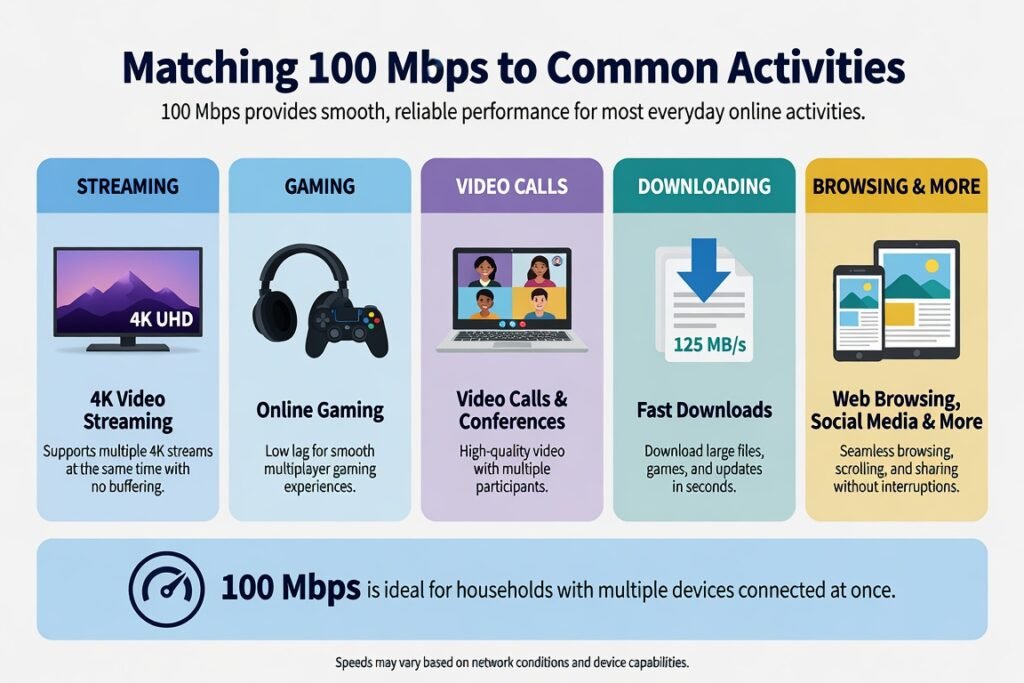
Streaming video: Netflix lists 5 Mbps for Full HD (1080p) and 15 Mbps for 4K Ultra HD per stream. On paper, 100 Mbps could support three or four simultaneous 4K streams; in practice, keeping it to two or three plus other light traffic avoids quality drops. YouTube 4K uses similar or slightly higher bandwidth.
Video calls and remote work: Zoom recommends roughly 1.2 Mbps for 720p and up to 3.8 Mbps for 1080p; Teams and Google Meet fall in a similar range. One or two concurrent HD calls, plus file sharing and email, leave substantial capacity. Large cloud uploads — video files, big presentations — simply take longer, so it’s worth scheduling those for off-peak hours.
Online gaming: Most multiplayer titles need only 3–25 Mbps once loaded, and latency matters more than peak speed for gameplay feel. 100 Mbps supports smooth play for one or two gamers. Cloud gaming services like Xbox Cloud Gaming or GeForce NOW recommend roughly 15–50 Mbps depending on resolution — one stream works well, two can strain the connection.
Downloads and smart-home devices: A 10 GB game update takes roughly 15–20 minutes at full theoretical speed. Individual smart plugs, cameras, and speakers use only a few Mbps each, but dozens running background updates at once can add up — scheduling those overnight helps.
A mixed-household evening, for example: two 4K streams (~30 Mbps) + one HD Zoom call (~3 Mbps) + an online game (~10 Mbps) + browsing and smart devices (~10 Mbps) totals roughly 53 Mbps — leaving a real buffer against Wi-Fi inefficiencies on a 100 Mbps plan.
Practical Tips for Getting the Most Out of 100 Mbps
- Run a wired Ethernet connection for the devices that need the most reliability — a gaming PC, work laptop, or main streaming device. Wi-Fi always loses some speed.
- Place the router centrally and elevated, keep firmware updated, and use the 5 GHz band for high-bandwidth devices.
- Enable Quality of Service (QoS) settings if your router supports them, so video calls and games get priority over background traffic.
- Test actual speeds at different times of day using a reliable tool like Ookla’s Speedtest or the FCC’s Measuring Broadband America app, and compare against your advertised 100 Mbps rate.
- Restart the modem and router periodically, and limit background app updates during active use.
- Confirm your plan’s data policy directly with your provider — most fixed broadband plans are unlimited or have high caps, but terms vary by location.
Common Mistakes to Avoid
- Assuming the full 100 Mbps reaches every device over Wi-Fi — distance, walls, and interference routinely cut speeds by 30–50%.
- Running multiple 4K streams plus large downloads at once without monitoring; buffering is usually the first symptom.
- Ignoring upload speed — slow uploads make video calls pixelated even when download looks fine.
- Sticking with an older router. A Wi-Fi 5 (802.11ac) or newer router extracts far more usable speed from a 100 Mbps plan than outdated hardware.
- Upgrading speed before optimizing what you already have. Many households that jump from 100 to 300–500 Mbps see little real-world difference once their existing connection is properly set up.
Conclusion
100 Mbps is a practical, cost-effective choice for the majority of U.S. light-to-moderate households. It comfortably supports HD and limited 4K streaming, video calls, online gaming, remote work, and everyday browsing when the network is set up correctly. Larger or heavier-usage households may need 200–300 Mbps or more during peak hours, but plenty of families run smoothly at 100 Mbps for years without issue.
The right approach is to test actual speeds, optimize the Wi-Fi setup, and match the plan to real simultaneous usage rather than marketing claims. Done right, 100 Mbps delivers reliable performance without unnecessary expense.
FAQ
Is 100 Mbps enough for a family of four?
Yes, for mixed moderate use — two streams, homework, and light gaming. Heavy simultaneous 4K streaming or multiple competitive gamers will benefit from a higher tier.
Can I stream 4K on 100 Mbps?
Yes. Netflix recommends 15 Mbps per 4K stream, so two or three concurrent 4K streams are realistic as long as other traffic on the network stays low.
Is 100 Mbps good for working from home?
It’s sufficient for most remote workers. HD video calls, cloud documents, and moderate file transfers all work well; frequent large uploads may feel slower than on a higher-tier plan.
How many devices can 100 Mbps support?
Roughly five to ten devices under moderate loads. The real limit is simultaneous high-bandwidth activity, not the number of devices connected.
Should I upgrade from 100 Mbps?
Upgrade if you regularly hit buffering during peak hours, run multiple 4K streams alongside gaming, or need faster large-file uploads. Otherwise, optimize first — many “slow” connections improve significantly with better equipment and router placement before a plan upgrade is even necessary.