

1000 Mbps internet delivers data at a theoretical maximum of 125 megabytes per second — roughly 7.5 gigabytes per minute, or about 450 gigabytes per hour under ideal conditions. Knowing this 1000 Mbps-to-gigabyte conversion helps you judge realistic download times, streaming capacity, and whether a gigabit plan actually matches how your household uses the internet.
Key Takeaways
- 1000 Mbps = 125 MB/s = 7.5 GB per minute = 450 GB per hour, at the theoretical maximum.
- Real-world speeds land at roughly 70–90% of the advertised rate on a wired connection, due to network overhead, Wi-Fi interference, and device limits.
- Mbps and MBps are not the same unit. 1000 Mbps is 125 megabytes per second, not 1000 — a common source of confusion.
- Upload speed matters as much as download for video calls, cloud backups, and live streaming, and is often lower than download on the same plan.
- A 1000 Mbps plan doesn’t override a data cap. Speed and data allowance are separate; check your plan’s terms if it isn’t unlimited.
Understanding Mbps and Gigabytes
Internet speed is measured in megabits per second (Mbps). Data volume is measured in gigabytes (GB). These are different units, and mixing them up is the single most common mistake people make when estimating download times.
One byte equals eight bits, so converting requires dividing by 8:
- 1000 megabits per second ÷ 8 = 125 megabytes per second (MB/s)
- In one minute: 125 MB × 60 = 7,500 MB = 7.5 GB
- In one hour: 7.5 GB × 60 = 450 GB
That 450 GB/hour figure is the theoretical ceiling for a perfect, uncontended 1000 Mbps connection. In practice, real-world speeds run lower because of network overhead, Wi-Fi interference, device limits, and server-side throttling — most U.S. households see 70–90% of the advertised rate on a wired connection.
This conversion is useful for estimating download times and household data throughput. It does not affect a monthly data cap if your plan has one — most U.S. fiber plans advertising 1000 Mbps are unlimited, but it’s worth confirming on your provider’s current plan page.
How Different Households Use a 1000 Mbps Connection
Rather than download time for a single file — which is the same for everyone on the same connection regardless of household size — what actually varies by household is how much simultaneous bandwidth gets used and how much headroom is left over.
| Household / User Type | Typical Concurrent Activity | Approx. Bandwidth Used at Once | Headroom Left on 1000 Mbps | Practical Takeaway |
|---|---|---|---|---|
| Light user (1–2 people) | HD streaming, browsing, occasional downloads | 15–25 Mbps | ~975+ Mbps | Massive overkill; speed is never the bottleneck |
| Average family (3–4 people) | Multiple 4K streams, video calls, cloud backup | 100–150 Mbps | ~850+ Mbps | Comfortable headroom even at peak evening use |
| Heavy user / gamer household | 4K streaming, large game downloads, online multiplayer | 150–250 Mbps (spikes higher during downloads) | ~750+ Mbps | Game updates and patches finish in minutes, not hours |
| Work-from-home + media creator | Large file uploads, video editing transfers, multiple calls | 200–350 Mbps | ~650+ Mbps | Upload speed on the plan matters as much as download here |
| Small home office / light business | Cloud sync, video meetings, shared drives | 100–200 Mbps | ~800+ Mbps | Reliable for remote work without midday slowdowns |
Even light users benefit from the low latency and instant response times that come with a fast connection. Heavy users and creators notice the biggest practical difference — mainly in large file transfers and multi-gigabyte game updates, not in everyday browsing.
Converting Mbps to Gigabytes, Step by Step
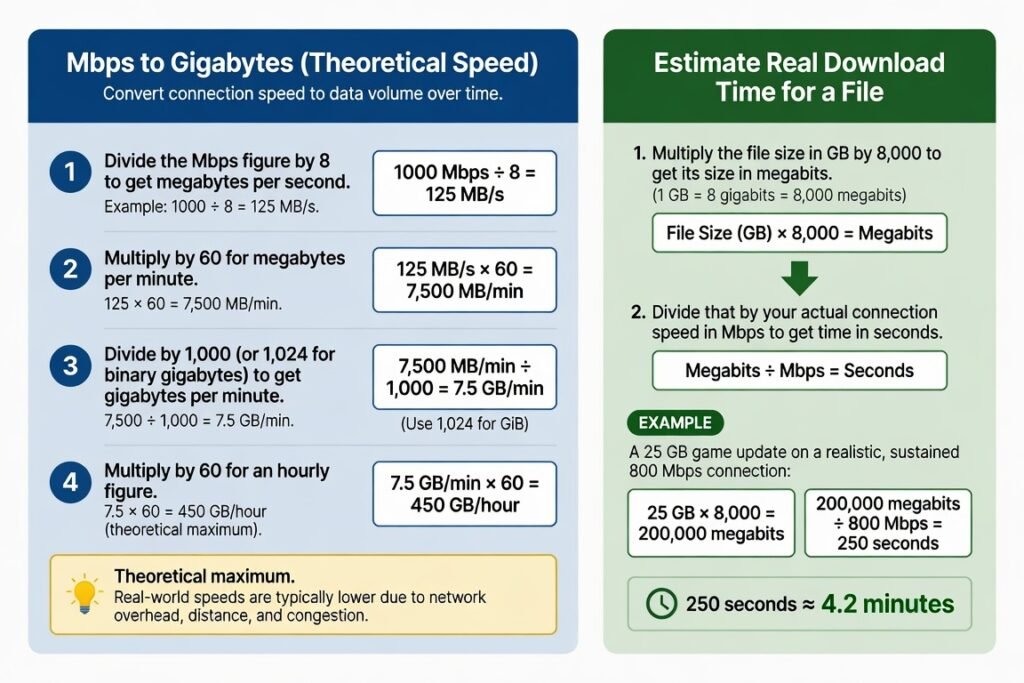
To convert a connection’s theoretical speed into a data volume:
- Divide the Mbps figure by 8 to get megabytes per second. Example: 1000 ÷ 8 = 125 MB/s.
- Multiply by 60 for megabytes per minute: 125 × 60 = 7,500 MB/min.
- Divide by 1,000 (or 1,024 for binary gigabytes) to get gigabytes per minute: 7,500 ÷ 1,000 = 7.5 GB/min.
- Multiply by 60 for an hourly figure: 7.5 × 60 = 450 GB/hour (theoretical maximum).
To estimate real download time for a specific file:
- Multiply the file size in GB by 8,000 to get its size in megabits (1 GB = 8 gigabits = 8,000 megabits).
- Divide that by your actual connection speed in Mbps to get time in seconds.
Example: A 25 GB game update on a realistic, sustained 800 Mbps connection: 25 × 8,000 = 200,000 megabits 200,000 ÷ 800 Mbps = 250 seconds ≈ 4.2 minutes
Comparing Common U.S. Speed Tiers for the Same 25 GB File
Using realistic sustained rates rather than advertised maximums:
- 100 Mbps plan → roughly 35–40 minutes
- 300 Mbps plan → roughly 12–15 minutes
- 500 Mbps plan → roughly 7–9 minutes
- 1000 Mbps plan → roughly 4–5 minutes
The jump to 1000 Mbps becomes most noticeable with larger files, or when several people are pulling bandwidth from the same connection at once.
Practical Tips for Getting the Full Benefit
- Test your actual speed with a wired Ethernet connection first, using a reputable speed test site at a few different times of day.
- Connect devices that support gigabit Ethernet or Wi-Fi 6/6E — older hardware often maxes out far below 1000 Mbps regardless of your plan.
- Place the router centrally and elevated, and use the 5 GHz or 6 GHz band for your highest-speed devices.
- Schedule large downloads overnight if several people share the connection during the day.
- Monitor data use in your provider’s app if your plan has any soft caps or throttling thresholds.
Common Mistakes to Avoid
- Assuming the full 450 GB/hour is always available — real-world conditions almost always reduce it.
- Paying for a 1000 Mbps plan while running only Wi-Fi 5 or older devices that can’t take advantage of the speed.
- Confusing Mbps with MBps and assuming 1000 Mbps means 1000 megabytes per second — it’s actually 125.
- Ignoring upload speed, which many everyday activities — video calls, cloud backups, live streaming — depend on more than download.
- Overlooking that the weakest link (an old router, a distant room, congested Wi-Fi) limits the whole experience, no matter how fast the plan is.
Conclusion
A 1000 Mbps connection can theoretically move about 7.5 gigabytes every minute, or 450 gigabytes every hour. Real-world numbers in a typical household run lower, but still fast enough to make large downloads feel nearly instant and to support several 4K streams without buffering. Knowing the accurate Mbps-to-gigabyte conversion lets you judge whether that speed actually matches your household’s usage — and helps you avoid paying for capacity you’ll never touch. Test your current connection, match your devices to the plan, and the difference becomes obvious.
FAQ
How many gigabytes can I download in one hour at 1000 Mbps?
Theoretically up to 450 GB. In real-world conditions, most users see 300–400 GB depending on network quality and device capability.
Is 1000 Mbps the same as 1 gigabyte per second?
No. 1000 Mbps equals 125 megabytes per second, or 0.125 gigabytes per second.
Will a 1000 Mbps plan eliminate buffering for 4K streaming?
In almost all cases, yes — even with several devices streaming at once — provided your Wi-Fi or wired connection can deliver most of that speed to each device.
How long does it take to download a 50 GB file at 1000 Mbps?
At a realistic sustained rate of around 800 Mbps, roughly 8–10 minutes. At the theoretical maximum, closer to 6–7 minutes.
Do I need special equipment to get the full benefit of 1000 Mbps?
Yes. A gigabit-capable router, Ethernet cables rated Cat 5e or higher, and devices that support high-speed Wi-Fi or wired connections. Older equipment will cap your real-world results well below the plan’s rated speed.